
Overview
Meshy offers two kinds of discounts.
Limited-time promotions running on the pricing page are applied automatically at checkout, so no code is needed.
Promo codes are redeemed as coupons on your account. The official codes that currently work are listed on the Promo Code page. Each code states its own eligibility and validity period, so please check these details before redeeming.
Codes circulating on third-party sites are often expired, and some were never issued by Meshy at all, so check any code against the official Promo Code page before you rely on it.
This article explains how to redeem a promo code.
How to find the promotion code
You can view all available discount coupons for your account under Settings > Subscriptions, then scroll down to the Discount section.
How to add promotion code
Once you have a code, redeem it in the app: click the gift icon in the left sidebar and choose Redeem Code. The code is then saved to your account as a coupon, and you can use that coupon at the subscription checkout page to pay the discounted price.
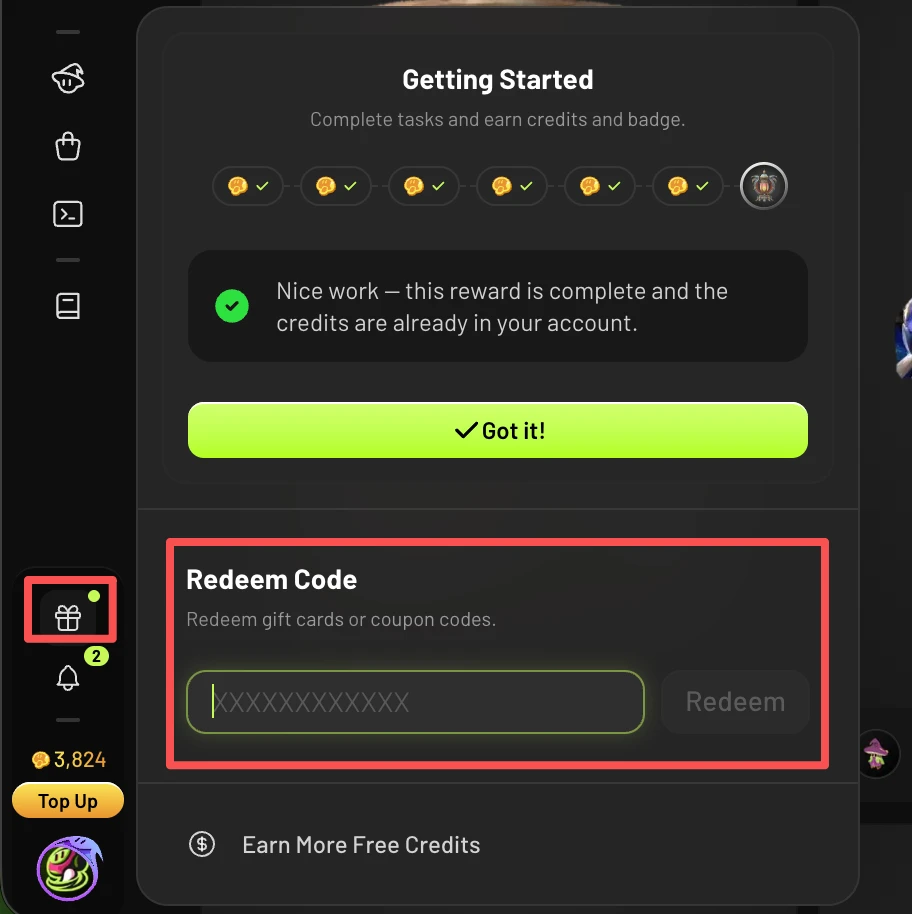
You can hold several coupons at the same time. Each order takes one coupon, and the one with the largest discount is applied automatically, so there is no need to use up an existing coupon before redeeming a new code.
FAQ
1. Why isn’t my promo code working?
There are usually three reasons:
The code is no longer valid (expired or fully redeemed). Check the Promo Code page for the codes that currently work.
The code isn't meant for your account. Codes from new-user promotions can't be used by existing accounts, and some codes are limited to particular plans. The eligibility is stated in each code's details.
You're paying with PayPal. Promo codes and coupons currently can't be applied to PayPal payments, so pay by credit or debit card instead.
If you’ve checked all of these and still have trouble, email support@meshy.ai, or click your profile icon in the bottom-left corner and select Message Support (available to paid users only) to report the case.
2. Are there any long-term ways to save?
Yes. Meshy offers several ongoing options:
Annual billing: always 20% off compared to monthly billing.
Education plan: students can apply for a discounted plan, see details.
3. Can existing users use promo codes?
It depends on the code. Codes issued for existing users can be used by existing users. Codes for new-user promotions can’t be used by existing accounts. The eligibility is stated in each promotion’s details.
4. Can I use a promo code when paying with PayPal?
No. Promo codes and coupons currently can’t be applied to PayPal payments. If you paid with PayPal and missed out on a discount as a result, we’re unable to refund the price difference. To use a promo code, pay by credit or debit card instead.