
This guide is designed for experienced users who want to push the boundaries of Meshy AI and achieve highly specific, creative, and polished 3D models. Advanced prompt engineering involves using a structured approach to leverage complex keywords and detailed artistic styles to get consistently great results.
The In's and Out's of an Advanced Prompt
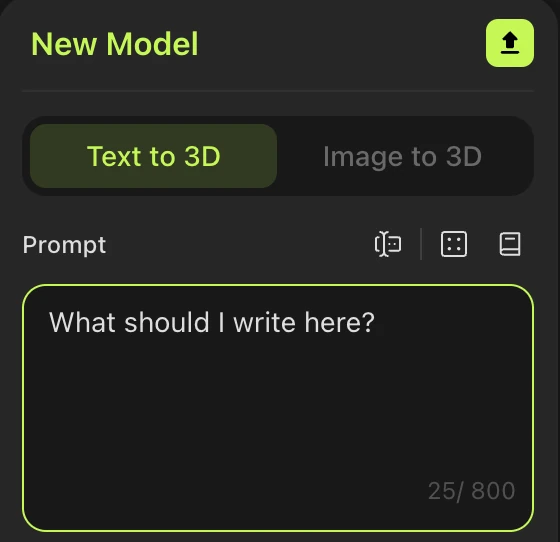
A powerful Meshy prompt is more than just a list of keywords. It can be broken down into three key components:
Subject: The core object or character you want to create (e.g., "a robot," "a knight," "a futuristic car").
Modifiers: Words that describe the subject's properties, materials, colors, and specific details. This is where you add complexity and nuance.
Styles: Keywords that define the overall aesthetic, artistic genre, or visual characteristics of the model.
Example of a structured prompt: A fearsome dragon, (Subject) with polished obsidian scales, glowing red eyes, and intricate bone armor, (Modifiers) in the style of a dark fantasy video game concept art, highly detailed, cinematic lighting. (Styles)
Note: Negative Prompts Are Not Supported
At the moment, Meshy does not support negative prompts. Instead of trying to exclude elements, focus on positive descriptors that guide the model toward what you want. For example, instead of excluding "dark lighting," add "bright lighting, daylight, vivid colors" to steer the result in the right direction.
Mastering Advanced Modifiers and Keywords
Meshy responds to a vast vocabulary of descriptive terms. Using these effectively can dramatically change your results.
Common Advanced Modifiers:
Materials:
polished metal, aged wood, rusty iron, iridescent glass, carved stone, luminescent crystal, cracked leatherDetails & Textures:
intricate carvings, fine filigree, smooth surface, rough texture, futuristic circuitry, glowing runesLighting & Atmosphere:
cinematic lighting, dramatic shadows, soft ambient light, volumetric fog, ethereal glowPoses & Stances:
T-pose, A-pose, dynamic action pose, in motion, sitting, standing(useful for character models)Quality & Realism:
highly detailed, ultra-realistic, photo-realistic, masterpiece, 8k resolution, Unreal Engine, Octane render
Example: A steampunk-style owl, with intricate clockwork wings made of brass and copper, glowing gears, and a monocle on one eye. Cinematic lighting, smooth metal texture, ultra-detailed.
Exploring Specific Artistic Styles
Meshy can generate models in a wide range of artistic styles. By combining keywords, you can create unique aesthetics that are tailored to your project.
Examples of advanced style combinations:
Cyberpunk Neon:
cyberpunk, neon glow, holographic, sci-fi, dark atmosphere, Japanese street styleFantasy Diorama:
diorama, miniature scale, highly detailed, hand-painted, clay-sculpted, whimsical, fantasy artAncient Ruins:
ancient ruins, overgrown with vines, cracked stone, mossy, mysterious, cinematic, volumetric lightingAnime Cell Shading:
cell shaded, anime art style, sharp lines, vibrant colors, clean edges, stylizedLow Poly Aesthetic:
low poly, simple shapes, vibrant colors, flat shading, geometric, retro video game style
Example: A magical tree, with leaves made of sapphire crystals, glowing runes on its bark, and floating ethereal wisps around it. Low poly style, vibrant colors, isometric perspective.
The Iterative Process
Advanced prompt engineering is a process of refinement. Start with a simple prompt and then:
Generate: Create a few variations to see what works.
Refine: Analyze the results. What did you like? What did you dislike?
Adjust: Add more descriptive keywords, or try a different style combination.
Repeat: Continue this process until you achieve the desired outcome.
By mastering these techniques, you'll be able to unlock the full creative potential of Meshy AI, turning your most imaginative ideas into stunning 3D models with precision and control.
Frequently Asked Questions
1. How long should my prompt be?
Aim for 20–60 words. Too short gives vague or generic results; too long can dilute the weight of each keyword. Lead with the most important details first — Meshy gives more weight to terms that appear earlier in the prompt.
2. Does keyword order matter?
Yes. Put your subject first, followed by the most critical modifiers (material, texture, detail), then style keywords at the end. Terms earlier in the prompt carry more influence over the output.
3. Can I use negative prompts?
Not currently — Meshy doesn't support negative prompts. Use positive alternatives instead. For example, if you want to avoid a dark aesthetic, add "bright lighting, vivid colors, daylight" rather than trying to exclude the unwanted look.
4. Why doesn't my model match my description?
Common reasons include: (1) the prompt is too vague — add more specific material and style modifiers; (2) conflicting style keywords are pulling the result in different directions; (3) the subject description is ambiguous. Use the iterative approach — generate, analyze what's off, then adjust one or two keywords at a time.
5. Can I reference specific art styles or franchises?
Yes. Referencing a recognizable visual style — such as "Studio Ghibli," "Blizzard Entertainment concept art," or "Warhammer 40K miniature" — can strongly steer the aesthetic. Combine with material and lighting keywords for the best results.
6. What's the best pose for character models?
For characters you plan to rig or animate, use "T-pose" or "A-pose." For display or portfolio pieces, try "dynamic action pose" or describe a specific stance, such as "sword raised, battle stance."
7. How do I generate game-ready assets?
Add keywords like "low poly," "game-ready," "optimized topology," and "PBR textures" to your prompt. For mobile or stylized games, try "low poly, flat shading, vibrant colors."
8. My model has too many floating or disconnected parts — what can I do?
Add "solid construction," "single solid mesh," or "unified form" to your prompt. Avoid listing too many separate accessories or attachments at once, which can encourage disconnected geometry.
More info on Text to 3D model generation can be found here.