
Meshy 7.1, Meshy 6 Lite and Meshy 6 are three versions of Meshy's core AI model to generate high detailed models. Each delivers high-quality 3D assets from text and images, with meaningful improvements across generations. This guide breaks down what sets these versions apart so you can choose the right model for your project.
What's New in Meshy 7
Meshy 7 (launched August 2026) delivers the strongest prompt-to-model alignment of any generation. Characters and objects more closely match your original description or reference image — reducing the need for prompt iteration and rework.
Meshy 7 also brings a major uplift in both geometry quality and texture fidelity. Surfaces are cleaner, details are sharper, and textures are more consistent across the model — making outputs more suitable for production use with less post-processing.
What Meshy 6 Lite Offers
Meshy 6 Lite (released August 2026) is a faster, streamlined variant of the Meshy 6 architecture, designed for quick iteration and accessible generation.
-
Fast generation — Uses a lightweight pipeline (~8 seconds for draft), ideal for rapid prototyping and iteration
-
Good geometry quality — Built on the Meshy 6 architecture, producing watertight meshes with clean topology
-
Core 3D generation — Supports Text to 3D and Image to 3D with standard retexturing capability
Note: Meshy 5 was discontinued in August 2026. If you previously used Meshy 5, Meshy 6 Lite is the recommended alternative.
What Meshy 6 Offers
Meshy 6 (released January 2026) was a full generational upgrade focused on production-ready geometry, cleaner outputs, and expanded creative workflows.
Meshy 6 generates watertight meshes with cleaner topology out of the box. Characters and organic shapes come with smoother, more anatomically correct geometry. Hard-surface objects benefit from sharper edges and cleaner silhouettes — significantly reducing the manual cleanup work required after export.
Feature Comparison at a Glance
Feature | Meshy 6 | Meshy 6 Lite | Meshy 7 |
Image to 3D | ✓ | ✓ | ✓ |
Batch Image to 3D | ✓ | ✓ | ✓ |
Text to 3D | ✓ | ✓ | ✗ |
Ultra mode | ✗ | ✗ | ✓ |
Multi-view | ✗ | ✗ | ✓ |
Split | ✓ | ✗ | ✓ |
Pose | ✓ | ✗ | ✓ |
Image Enhancement | ✓ | ✗ | ✓ |
License | CC BY 4.0 & Private | CC BY 4.0 & Private | CC BY 4.0 & Private |
Texture | 2k/4k | ✓ | 2k/4k/8k |
Draft mode previews | 1 white model (downloadable) | 1 white model (downloadable, ~8s) | 1 white model (downloadable) |
Animation | ✓ | ✓ | ✓ |
Choose Meshy 7 if…
-
You want the best possible alignment between your prompt and the generated model
-
You need the highest geometry and texture quality for production-ready assets
-
You're starting a new project and want the latest generation's improvements
-
You work with characters or detailed objects where accuracy to the source matters most
FAQ
1. Can I switch between Meshy 6 Lite, Meshy 6, and Meshy 7?
Yes. The model version is chosen per generation task. You can use different versions for different projects. You can select and switch between models from the dropdown according to the below instruction.
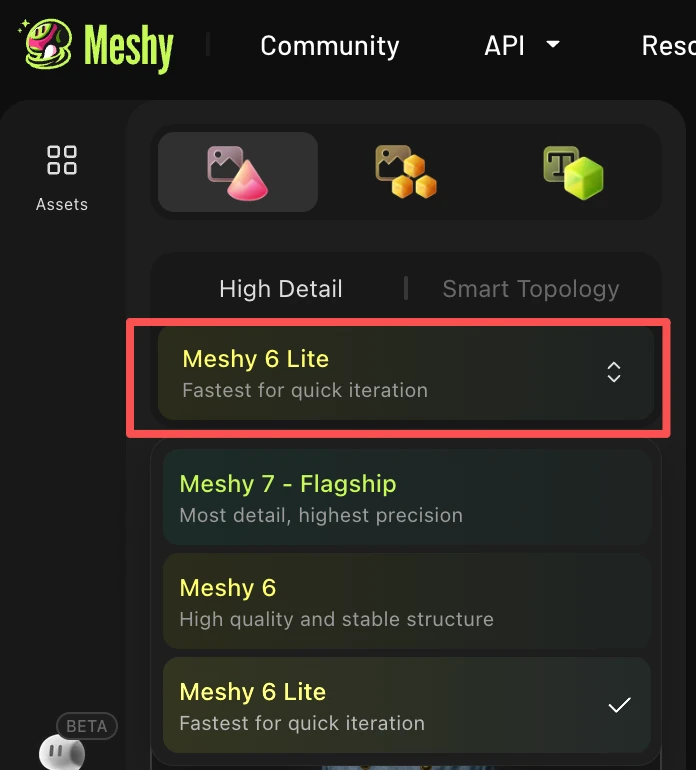
Note: we do not have Meshy 7 for Text to 3D, and it will not be added there. Please use 3D Agent if you wish to use Meshy 7 from text inputs.
2. Why does my output look different between model versions?
This is expected — each version uses a different architecture or configuration. If you need outputs consistent with a previous project, use the same model version for all assets in that project.
3. What happened to Meshy 5?
Meshy 5 was discontinued in August 2026. If your workflow was built around Meshy 5, we recommend switching to Meshy 6 Lite — it's a faster, streamlined version of the Meshy 6 architecture and serves as the natural successor. Meshy 6 and Meshy 7 remain fully available.